
Frequently Asked Questions
MICHEL THOMAS AND THE METHOD
Is this the right course for me?
Anyone can learn a language with the Michel Thomas Method. Not only did Michel himself instruct the rich and famous, but he also taught many so-called ‘hopeless cases’. For example, in 1997 in a BBC documentary by Nigel Levy, Michel taught French to a group of sixteen-year-olds in north London who had been told they could never learn a language, and gave them the ability to use the new language far beyond their expectations – in just a week. Whatever your motivation for learning a language, the Michel Thomas Method quite simply offers the most effective method that is available.
How do the Michel Thomas Method courses match up to the CEFR and ACTFL proficiency scale?
These courses teach you the structure of the language and focus on speaking, listening and understanding. They do not correlate to the Common European Framework of Reference for Languages (CEFR) or the American Council on the Teaching of Foreign Languages (ACTFL) proficiency scale very clearly but by the end of the Intermediate course you will have a good understanding of the language and you will have covered all verb forms in the language.
How long does it take to learn with the Michel Thomas Method?
A knowledge of the language that will take months of conventional study can be achieved in a matter of weeks with the Michel Thomas Method. The teacher masterfully guides the student through an instructional process at a very rapid rate – yet the process will appear informal, relaxed and unhurried. The teacher moves quickly between numerous practice sessions, which all build the learners’ confidence in their ability to communicate in complex ways. Because the Michel Thomas Method is based on understanding, not memorization, there is no set limit to the length of time that you should study the course. As a general rule, it takes 3-4 hours to complete a Start course, 20-30 hours to complete a Foundation course, and 15-20 hours to complete an Intermediate course – but the courses are not divided into lessons, and you can stop and start as you please.
Who was Michel Thomas?
Michel Thomas was born Moniek Kroskof, the only son of a Jewish family who owned a textile factory in Poland in 1914. As a young boy, Michel was sent to live in Germany to escape the anti-Semitism directed at his family. Living in Vienna in 1938, when the Nazis annexed Austria, Michel was rendered stateless as a Jew.
He fled the country for France, and when the Germans invaded, he joined the French Resistance and adopted the name Michel Thomas. He spent two brutal years in French concentration and labour camps, narrowly avoiding being sent to Auschwitz. He escaped, surviving capture, interrogation by Klaus Barbie, and torture by the Gestapo. His mastery of languages enabled him to adopt many identities. At the end of the war, he masterminded operations to uncover war criminals and infiltrate underground Nazi groups.
In 1944, Michel was nominated for the Silver Star medal for his service to the US Army’s 45th Infantry Division in France. The award was finally presented to him in May 2004, sixty years later.
It was during Michel’s wartime experiences, particularly his torture by the Gestapo, that he became aware of the immense, largely untapped, power of the brain. By focusing all his strength on inventing a story plausible enough to satisfy his torturers, he discovered an ability to place his mind beyond the physical and to block out pain. He said, “I concentrated so hard, that I stopped feeling pain. I was amazed at myself.”
Fascinated by this experience, he was determined that after the war, he would devote himself to exploring how the brain worked and dedicated his life to education. “I contemplated the untapped reserves of the human mind. The great hidden depths of the brain. I learned from it.”
In 1947, he moved to Los Angeles and set up the Michel Thomas Language Centers, teaching languages for over fifty years in New York, Beverly Hills and London.
His extraordinary life and revolutionary teaching methods were documented in Nigel Levy’s film The Language Master, which brought Michel Thomas to a wider public in the UK and beyond for the first time.
How can I find out more about Michel Thomas?
There are a few books about the Michel Thomas, including Christopher Robbins’ Test of Courage (a biography) and Dr Jonathan Solity’s The Learning Revolution (a history of the man and his method). His extraordinary life and revolutionary teaching methods were documented in Nigel Levy’s film The Language Master, which brought Michel Thomas to a wider public in the UK and beyond for the first time.
The courses and choosing the right one
Which order do I do the courses in and where do I start?
If you are unsure the method will work for you, we recommend you try the Start course first. This is the first hour of the Foundation course and will give you a good grounding. If you are confident that it is the method for you then you should begin with the Foundation course. This is an 8-hour beginner course and includes the Start course content.
Even if you have studied the language previously and wouldn’t consider yourself a complete beginner, it is a good idea to start from the beginning as the course builds on itself. If you think you have progressed passed beginner altogether, we recommend downloading the free booklets from our website so you can see for yourself the key phrases being taught so that you can determine where you need to begin (buttons which link to the free booklets can be found on each of the language pages on our website).
After that you should do the courses in this order (note not all courses are available for all levels):
1. Start
2. Foundation
3. Language Builder
4. Intermediate
5. Vocabulary Builder
6. Insider’s
NB: The Start course, which is the first hour of the Foundation course, is for people who want to try the method before committing to the price of the full Foundation course. Please note that we cannot refund the Start course if you later choose to purchase the Foundation course.
Is the Michel Thomas Portuguese course for Brazilian Portuguese or European Portuguese?
The Michel Thomas Portuguese course is for learning European Portuguese.
What is the difference between the website, apps, CDs and audio products?
The audio content is the same across all platforms, however each product has different features.
• The website allows you to stream the audio online and access the supporting booklet for any Michel Thomas course across all your devices. It also allows you to download content to the accompanying Michel Thomas Method Library app on iOS and android. This also allows you to alter the speed of the audio if you need to.
• The audio course is available on all audio book platforms; there is also an accompanying booklet containing key vocabulary for reference.
• The CDs contain the teaching content, interactive elements and a link to the booklets online (please note some of the interactive elements are in Flash Player which is no longer supported).
Purchasing one of these will not give you access to another; they are separate products and the content is not transferable between them.
What will I learn with the Michel Thomas Method courses?
The Michel Thomas Method teaches the everyday conversational language that will allow you to communicate in a wide variety of situations, empowered by the ability to create your own sentences and use the language naturally, having absorbed the vocabulary and grammatical structures.
Phase 1 courses
Foundation, Language Builder and Intermediate courses form the Phase 1 foundation for all your learning. These courses focus on teaching verbs and verb tenses, which form the structure of the language. While you will learn a large amount of useful vocabulary, it is limited so as not to overburden your learning.
Phase 2 courses
Vocabulary and Insider’s, the Phase 2 courses, build on your foundation by increasing your vocabulary knowledge, and conversational fluency.
What do the course names mean; what will I learn in each course?
To get an overview of the course content please take a look at the free booklets that accompany each of our courses on our website (buttons which link to the free booklets can be found on each of our language pages).
Start
The Start course is a taster course for beginners who are new to the Michel Thomas Method. This course consists of the first hour of the audio from the Foundation course, which consists of a live lesson between a teacher and two students.
In this hour you will get a taste of the Michel Thomas Method, learning over 50 essential words and how to put them together to make yourself understood, and constructing simple phrases by listening and thinking out answers for yourself. You will learn at your own pace, pausing and repeating where necessary, to complete the taster course in 3-4 hours.
Foundation
Foundation is a beginner’s phase-1 course that teaches the basic structure of the language. You will learn along with two students, hearing both their successes and their mistakes to keep you motivated and involved throughout the course. Within the first hour you will be able to construct simple sentences, and by the end of the course you will have the confidence to understand and speak the basics of the language you are learning.
This live course lasts between 8-10 hours, but you will learn at your own pace, pausing and repeating where necessary, to complete the course in 20-30 hours. This course also includes 2 hours of review audio, with only the phrases learnt (no explanations or repetition), which should be listened to after completing the course to check your learning.
Language Builder
Language Builder is a 2-hour phase-1 course for improving beginners, which takes the form of a one-to-one seminar. This course consolidates everything you’ve learned in the Start and Foundation courses. Or, if you’re new to Michel Thomas, it’s ideal for brushing up your language skills. This course will widen your vocabulary and teach authentic phrases and expressions, as well as providing a comprehensive grasp of the structure of the language, enabling you to communicate with confidence.
Intermediate
Intermediate is a phase-1 course, taking the form of a 5-hour live lesson which expands upon what you have learnt in the Foundation and Language Builder courses. You will learn along with two students, hearing both their successes and their mistakes to keep you motivated and involved throughout the course.
As with the earlier levels, the Intermediate course breaks down the language into building blocks that are introduced sequentially so you can create more complex sentences, improve your conversation skills, and your grammar and vocabulary.
You will learn at your own pace, pausing and repeating where necessary, to complete the course in 15-20 hours.
This course also includes 1 hour of review audio, which includes only the phrases learnt (with no explanations or repetition), which should be listened to after completing the course to check your learning.
Vocabulary
Vocabulary is a phase-2 course which adds key vocabulary to your foundation, with over 1000 new words and phrases. You will learn alongside two students, including speakers of the target language, so you can improve your pronunciation. The course includes 5 hours of live audio, and takes about 10-15 hours to complete.
Insider’s
Insider’s is a 5-6 hour phase-2 High Intermediate course which follows on from the previous courses. This course includes real conversations on key topics, teacher and student lessons covering language structures, and sections specifically focusing on pronunciation. The focus on colloquial language, cultural insights, and conversation strategies used by speakers of the target language will enable you to communicate more naturally and incorporate contemporary language and culture into your repertoire.
My product edition has a different name, what is the next/equivalent course?
Below you can see how the latest edition of each course relates to their previous iterations (arranged from latest edition –> earliest edition).
Start* (latest edition) = Introductory
Foundation** (latest edition) = Total = Foundation = Beginner’s
Language Builder (latest edition) = Masterclass = Language Builder
Intermediate (latest edition) = Perfect = Advanced
Vocabulary Course (latest edition) = Vocabulary Builder = Vocabulary Course
If you are considering a purchase, we always recommend getting the latest edition.
* Note: Start is the first hour of Foundation.
** Note: Foundation includes Start.
Is there a hands-free driving mode?
None of our course formats currently offer a hands-free driving mode, however we have had several requests for this and hope to add this functionality – stay tuned to our social media for updates.
What is the ‘classroom style’ and why is it important?
The Michel Thomas courses are recorded in a classroom situation which takes the pressure away from you learning on your own. You enjoy the students’ success, and you learn from their mistakes. The students on the recordings are not reading from scripts and they have received no additional instruction or preparation – just the guidance you hear on the recording. You, as the learner, become the third student and participate actively in the class. You learn through your own language, so there’s no anxiety.
How does an all-audio course in ‘real time’ work?
The courses are recorded live in a studio with two real students. Each language is learned in ‘real-time’ conditions. There is no need to stop for homework, additional exercises or vocabulary memorization. The emphasis is on giving yourself time to think out responses to the teacher’s prompts; by thinking things through, you will be embedding the language in your brain in the way that research has shown to be the most effective way of transferring information to your long-term memory.
Do we offer one-on-one lessons using the Michel Thomas Method or training as an MTM teacher?
As a publisher we only offer audio courses of the Michel Thomas Method, we do not offer personal tuition or training in the Method.
Why doesn’t Michel Thomas teach on all the Michel Thomas Method courses?
Michel Thomas’ legacy was such that even after his passing in 2005, customers wanted more Michel Thomas courses and also wanted new courses in major world languages. Hodder & Stoughton – publishers of the Michel Thomas Method range – responded with a careful vetting of talented authors/teachers who dedicated themselves to mastering his method and adapting it to produce courses that authentically and carefully applied his methodology and made breakthroughs that Michel Thomas himself would have endorsed. Hodder Education editors and authors scrupulously oversaw each and every draft and subsequent recording sessions and the results are a testimony to the man and his method.
Can I use the Michel Thomas Method courses to do a GCSE or A-Level?
The Michel Thomas Method courses are a brilliant supplement to studying a language, as they can help the learner gain confidence in speaking and listening skills. However, the Michel Thomas Method courses do not follow a set curriculum, and therefore cannot be used as the sole study aid for a GCSE or equivalent qualification. If you wish to take a formal exam in a language, we would advise you to purchase a course that follows the curriculum of the qualification you wish to obtain.
The Michel Thomas Method courses come in several different forms purchasable in various different places, which one should I get?
Please find out all about the various formats our Michel Thomas Method products come in here.
Michel Thomas Website and Library App
What will I get if I purchase the courses on your website?
Digital versions of our courses are available from our website. This means you will be able to stream your courses online via your web browser, or download the course to the accompanying Michel Thomas Method Library app on iOS or android.
Please note that we do not sell CDs via our website. If you would like to purchase the courses on CD you can do so via most book retailers in the UK and USA, or from the Book Depository for worldwide delivery.
I am trying to log into the Michel Thomas Language Library app but it isn’t recognizing my details
Firstly, please check you created an account for this product. You can only create an account for this on our website www.michelthomas.com or via the android app. The iOS Michel Thomas Language Library app is login only.
If you did create an account as above, please double check you are using the same details as the account you created. It is also worth double checking that you didn’t accidentally sign up with an email address containing a typo. If you typed your email address in correctly you should have received a confirmation email.
If the app is still not recognising you but should be, or if you think you may have signed up with an incorrect email address, please get in touch via our contact form here. Be sure to give as much information about where you signed up, which app you are trying to access and what problem you are having in your message, as well as giving us the email address associated with your account. This will enable us to resolve the issue more quickly.
I have downloaded my course to the Michel Thomas Language Library app but I can’t access it
There may be a short delay between getting your order confirmation and the course appearing in your library. However, if it takes longer than a few minutes, please try deleting and reinstalling the app. You should then see all purchased courses under ‘All Books’, from there you will be able to download the courses to your device. They will then appear in the ‘Downloads’ tab.
If after reinstalling the app you are still unable to see the course please get in touch via our contact form here. Please ensure you provide as much information as you can about where you purchased the course, which app you are trying to access it through, your account details and what you have tried so far. This will help us get to the bottom of the issue more quickly.
I have downloaded my course to the app but only part of the track has downloaded
We are currently experiencing an issue where the track timing given in the track list is different to the actual track time. This is being caused by the way the media player is reading the tracks. All tracks are around 5-15 minutes, so we recommend checking the support booklet if it seems like a track has been cut off or if there is anything missing. We are working to resolve this issue and will provide an update as soon as possible.
If you still believe your tracks are not fully downloading or there is missing content, please get in touch via our contact form here. Please make sure you give as much detail as you can about the device you are using, the problem you are having and what you have already tried. This will enable us to assist you more quickly and effectively.
I am having trouble downloading my courses on the Michel Thomas Language Library app
Ensure you have enough storage and have a strong wifi connection to download your course(s). If you cannot download your course you may need to wait until you have better internet connection, or clear some space on your device.
Which devices can I use the Michel Thomas Language Library app on?
The Michel Thomas Language Library app can be used on Apple and Android devices. Once you have created an account you will be able to log into it on your computer via your internet browser, or on any iOS, android or Windows smartphone and tablet.
What is the Michel Thomas Method Language Library app?
The Michel Thomas Language Library app accompanies michelthomas.com. It allows users to download their website purchases, booklets or free lessons into the app for offline learning on the go. It is available on iOS here and android here. Purchases are not possible within this app.
Where can I input my discount/promotion code?
Please go to this URL to enter your code: https://library.michelthomas.com/redeem.
What are your terms of sale?
Our terms for licensing of digital content can be found here.
Will I be able to download the courses I buy on your website to my phone or computer?
No, you can only download the courses you have purchased into the accompanying Michel Thomas Method Library app on iOS or android. Alternatively you can stream the courses online.
How do I access courses I have purchased on the website?
Once you have created your account and purchased a course you will be able to access and stream it online via our website in the ‘My library’ area. You can also download the accompanying Michel Thomas Method Library app from the apple app store or the google play store. Once you have downloaded the app you will need to log in, then you will be able to see all of the courses you have purchased listed under the ‘All Books’ tab; this is where you can download courses to the app. Once they have been downloaded to the app they will also appear in the ‘Downloads’ tab in the app.
Which devices and/or browsers can I use to access courses purchased online or via the Library app?
You can access content in your library online using most browsers (Chrome, Mozilla, Internet explorer, Microsoft edge, Safari, opera etc.) and the app is available on both iOS and android as below.
Android: Android KitKat to latest
iOS: version 10.0 and above
I bought the wrong course on the website; how do I get a refund/exchange it?
Usually, if you have purchased a different course by mistake the best thing to do is to request a refund (by filling out this form and emailing it to support@michelthomas.com) and then purchase the correct course.
However, if the course you purchased by mistake is the same price as the one you want to change it for you can contact us via our contact form here with proof of purchase and the email address associated with your account and we will be able to swap the courses for you.
Please note that you have 14 days to request a refund and you will not be able to return your course if you have already finished it.
How do I cancel my order?
Fill out and sign this form and send to support@michelthomas.com within 14 days of us confirming your purchase and we will issue a refund within 14 days.
Can I purchase a course as a gift?
To purchase a course as a gift, select the product you would like to buy and upon check out, tick the ‘This is a gift’ box. Then enter the recipient’s name and email address, along with any message you would like to include.
The recipient will then receive an email with details on how to access their course.
Where can I try a free trial of the Method?
Every course has a free lesson. Simply go to the language you want to learn, download the lesson and start learning today.
How do I unsubscribe from marketing emails?
You must click on ‘unsubscribe’ which you will find in the footer of our marketing emails.
How do I delete my Michel Thomas Language Library app account?
We’re sorry to see you go, but please follow these simple steps to delete your account:
1. Go to the settings icon in the top left of the home screen on the app
2. Select the ‘Account’ cog icon
3. Click on ‘Delete Account’
Please note that there is no way to restore your account once it’s been deleted, and all your progress will be lost; it will not be possible to regain access to your course at a future time.
How do I delete my Michel Thomas Method website account?
We’re sorry to see you go, but please follow these simple steps to delete your account:
1. Ensure you are logged into your account on our website (select the ‘My Library’ button in the top right corner)
2. Select ‘Account’
3. Scroll to the bottom of the page and click on ‘Delete my account’
Please note that there is no way to restore your account once it’s been deleted, and all your progress will be lost; it will not be possible to regain access to your course at a future time.
I have purchased a Michel Thomas Method course on the website, can I access it elsewhere without paying again?
A Michel Thomas Method course purchased on the website can be accessed on the Michel Thomas Language Library app (on iOS and android), which accompanies the website, and allows you to download your course to listen to it offline. The courses on audio book platforms, CDs, as well as the Languages with Michel Thomas app are separate products, so courses bought via the Michel Thomas website cannot be transferred or accessed in these ways.
Individual language Michel Thomas Apps
Which Michel Thomas app should I get?
Firstly, please ensure you are looking at an official app, with Hachette UK (iOS) or Trellisys.net (android) listed as the developer.
The Michel Thomas Language Library on iOS and android – this is our official app which allows you to access content purchased online and download the content so you can listen on the move. It contains all languages and levels, and the supporting booklets. One account allows you to access the content online via your web browser or to download the content to the app on your iOS or android smartphone or tablet. You can find out more about the Michel Thomas Language Library here.
Note: Please be aware of pirate apps, such as:
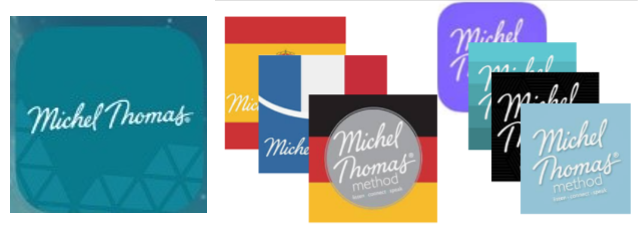
These are not associated with Michel Thomas so any purchases made through these apps cannot be refunded.
If you encounter an app which you suspect to be a pirated version of our Michel Thomas apps please contact us at support@michelthomas.com.
I have already purchased the course elsewhere, can I access the same course on the Michel Thomas Language Library app for free?
Unfortunately, there is no way to use courses purchased outside of the apps (eg website, CD or audiobook platform), within the app (with the exception of products purchased via the website which can be accessed via the Michel Thomas Library app on iOS and android). While the audio content is the same, they are different products with different features.
I made a purchase through the Michel Thomas iOS app and now I can’t access my courses, how do I get them back without paying again?
The original Michel Thomas languages (individual apps per language) iOS apps are no longer available on the app store due to compatibility issues with iOS 14.4 and above. However, we have another app, called the Michel Thomas Language Library, from which you can access your course(s) instead.
Due to App Store restrictions, we cannot migrate accounts across automatically, nor do we have access to users’ prior purchases, but with proof of purchase, we can send you a free code for the equivalent course(s) on our website (www.michelthomas.com), which will allow you to listen to the course and access the booklet PDF online via your browser or download the courses to the accompanying Michel Thomas Language Library app on iOS or android (blue icon with building blocks).
Please send your proof of purchase to support@michelthomas.com, and we will take the necessary action accordingly.
I bought the Languages with Michel Thomas app but it’s no longer working, why?
Unfortunately we had to close this app in September; if you did not receive notification of this via email please contact us at support@michelthomas.com.
Michel Thomas CD courses
I can’t find anywhere to purchase a Michel Thomas course on CD (and/or Amazon doesn’t deliver to my country)
We no longer produce CD courses, however the physical Michel Thomas courses (CDs) are still available from some book retailers in the US and UK.
I’ve lost the booklet that came with my CD course
Digital versions of the booklets are available to download here: www.michelthomas.com (simply navigate to the page of your language of choice). Please note that some of the course names have been changed (to better reflect the content) as below:
• Introductory became Start and remains Start
• Foundation became Total and is now Foundation (for some languages the Total courses included half of the Vocabulary Builder)
• Language Builder became Masterclass and is now Language Builder
• Advanced became Perfect and is now Intermediate (for some languages the Perfect courses included the Vocabulary Builder)
• Vocabulary Course became Vocabulary Builder and is now Vocabulary Course
I’ve lost a CD from my course
Unfortunately, we do not sell CDs anymore, however if you are missing a CD from the Foundation (previously called Total) course you can purchase audio by the hour (which is the equivalent to one CD) from Audible.
I bought a CD course several years ago but now I see there are apps. Can I have access to the apps so I can listen on my phone?
Unfortunately, our products are all separate and not interchangeable. However, you can save the files from the CDs onto your computer and transfer them onto your MP3 device.
My CD rom no longer works; can I get a replacement or the app version of the audio instead?
We no longer produce the course content on CD rom, however our courses are available to be purchased on various alternative formats; you can find out more and choose the format that’s right for you here.
My CD-ROM is not working
Please note that we have discontinued the CD-ROM so if the below doesn’t help, we can’t send a replacement. (This is because the product is flash-based which is no longer supported).
To be able to follow this process you must be the admin user of your computer. You will likely not be able to amend these settings if not.
To resolve the issue, go to the installed “Hodder Education” folder inside your Applications folder, select it, and do Command-i to Get Info. This will bring up a panel – at the bottom it should show “Everyone” as having No Access: this is the source of the problem, so click the padlock at the bottom right, authenticate yourself, then choose “Read” or “Read and write” from the appropriate dropdown. Move off the folder and back onto it and you should now be able to see the files within – and the links in the web browser should now work.
Once you’ve opened the link in the folder and gone into the browser do bookmark the page or you’ll need to go through the process each time.
If you are using Microsoft Edge:
The Microsoft Edge browser does not support the Java plug-in, which is required to run the videos on the CD-ROM. Please use Internet Explorer or Chrome instead.
If you are using Firefox 55:
There is a new security setting in Firefox 55 that supersedes everything else. Only SWF files retrieved on http:// or https:// addresses are played (not file://, ftp://, etc.). If you want to revert to the previous behaviour:
In a new tab, type or paste about:config in the address bar and press Enter/Return. Click the button promising to be careful.
In the search box above the list, type or paste plug*ht and pause while the list is filtered.
Double-click the plugins.http_https_only preference to switch the value from true to false
If you are using Firefox on Windows 10:
1. Download and install the latest Flash Player https://get.adobe.com/flashplayer/ (likely to require a restart).
2. Open Firefox and click Menu button (three horizontal bars).
3. Select Add-ons.
4. From the list on the left select Plugins. Shockwave Flash will be in the list. Select it.
5. Select Options and read down the information to the ‘Block dangerous and intrusive Flash content’ box and remove the tick.
6. Just below this is a drop down menu. Set this to be Ask to Activate rather than Always Activate.
7. Close Firefox and open Total Spanish and that will start Firefox again.
8. Choose Interactive Exercises, then a lesson. This will be the first time Flash has been called on and it will give you a chance to make Flash remember the decision to play it for this site.
I cannot access the interactive exercises on the CD-ROM
Please note that we have discontinued the CD-ROM so if the below doesn’t help, we can’t send a replacement.
PC
• Right-click on the coloured background which loads instead of the exercise
• Select “Global settings”
• In the web page that opens, click the Global Security Settings Panel link in the left-hand navigation, giving this URL: http://www.macromedia.com/support/documentation/en/flashplayer/help/settings_manager04.html (same as mentioned in the Help.)
• Select “Always allow”
• In the “Always trust files in these locations” dropdown, click “Add location”
• Click “Browse for folder”
• Select any file. It should appear in the listbox below (with a garbled path).
• In the listbox, click the name of the file you have just selected
• Select “Edit location” from the dropdown
• Type the location of the folder containing the product you’re having trouble with. By default, this will be “C:\Program Files (x86)\Hodder Education”.
• Click Confirm and close the browser tab.
• Close any tabs already containing the exercises.
The interactive exercises should now work.
MAC
• Right-click on the coloured background which loads instead of the exercise
• Select “Global settings”. Either a web page, or a System Preference will open.
If the webpage opens:
• Click the Global Security Settings Panel link in the left-hand navigation, giving this URL: http://www.macromedia.com/support/documentation/en/flashplayer/help/settings_manager04.html (same as mentioned in the Help.)
• Select “Always allow”
• In the “Always trust files in these locations” dropdown, click “Add location”
• Click “Browse for folder”
• Select any file. It should appear in the listbox below.
• In the listbox, click the name of the file you have just selected
• Select “Edit location” from the dropdown
• Type the location of the folder containing the product you’re having trouble with. By default, this will be “/Applications/Hodder Education”. NB the initial forward slash.
• Click Confirm and close the browser tab.
The interactive exercises should now work.
If it’s a System Preference panel which opens rather than a webpage:
• On the Advanced tab, click “Trusted Location Settings…”
• Click the + button at the bottom left
• Browse to the folder containing the product and click Open
• The path to the folder (by default “/Applications/Hodder Education”) will appear in the listbox.
• Close the panel
The interactive exercises should now work.